

- Introduction
- Overview: fxCumulativeToIncremental
- Required Custom Functions
- Function without documentation
- Function with documentation
- Examples
- Conclusion
Introduction
Click here to go straight to the function.
*Big thanks to Gil Raviv for his cumulative to incremental article for helping me get started creating this custom function.*
When working with data in Power BI, my preference is to work with fully additive facts.
Kimball briefly explains fact additivity here:
The numeric measures in a fact table fall into three categories. The most flexible and useful facts are fully additive; additive measures can be summed across any of the dimensions associated with the fact table. Semi-additive measures can be summed across some dimensions, but not all; balance amounts are common semi-additive facts because they are additive across all dimensions except time. Finally, some measures are completely non-additive, such as ratios. A good approach for non-additive facts is, where possible, to store the fully additive components of the non-additive measure and sum these components into the final answer set before calculating the final non-additive fact. This final calculation is often done in the BI layer or OLAP cube.
Additive, Semi-Additive, and Non-Additive Facts | Kimball Group
A common semi-additive data source you might run into is one with a running total column. What makes this semi-additive is that you can sum up the column in all dimensions except for time.
I much prefer to transform the running total column into an incremental one and then use DAX to create a running total measure instead of working with the complexity of a semi-additive DAX calculation. It is more work up front but provides a more flexible and easier to work with semantic model.
The following function transforms one or more cumulative columns and transforms those columns into incremental ones.
Overview: fxCumulativeToIncremental
Purpose:
This function transforms one or more running total columns into incremental columns
Parameters:
tableToTransform as table
The table containing the cumulative columns to be transformed.
groupByColumns as list
The columns that, when taken together, the running total is applied to.
sortByColumn as text
The time/sort by column for the running total.
columnsToTransform as list
The cumulative columns to be transformed to incremental.
Required Custom Functions
This function is dependent on these additional custom functions. Copy them into your Power Query project for fxCumulativeToIncremental function to work.
Function without documentation
let
    fxFunction =
        (
            tableToTransform as table,
            groupByColumns as list,
            sortByColumn as text,
            columnsToTransform as list
        ) as table =>
            let
                _create_groups = // Group all rows by group by columns
                    Table.Group (
                        tableToTransform,
                        groupByColumns,
                        {
                            {
                                "Group",
                                each
                                    _,
                                type
                                    table
                            }
                        }
                    ),
                _create_incremental_data = // For each set of grouped rows, create incremental column
                    Table.AddColumn (
                        _create_groups,
                        "Data",
                        each
                            let
                                _sort_by_date = // Sort data by sort by column
                                    Table.Sort (
                                        [Group],
                                        { { sortByColumn, Order.Ascending } }
                                    ),
                                _create_index = // Add index to be used for calculating difference between each cumulative row
                                    Table.AddIndexColumn (
                                        _sort_by_date,
                                        "Index",
                                        0,
                                        1,
                                        Int64.Type
                                    ),
                                _create_incremental_data_for_each_column = // For each cumulative column, create incremental column
                                    List.Accumulate(
                                        columnsToTransform,
                                        _create_index,
                                        (
                                            state,
                                            columnToTransform
                                        ) =>
                                            let
                                                _buffer_data = // Buffer results
                                                    List.Buffer (
                                                        Table.Column(state, columnToTransform)
                                                    ),
                                                _calculate_incremental_value = // Add column with calculated incremental value
                                                    Table.AddColumn (
                                                        state,
                                                        columnToTransform & " Incremental",
                                                        each
                                                            if
                                                                [Index] > 0
                                                            then
                                                                Record.Field(_, columnToTransform) -
                                                                    _buffer_data { [Index] - 1 }
                                                            else
                                                                Record.Field(_, columnToTransform),
                                                        type
                                                            number
                                                    )
                                                in
                                                    _calculate_incremental_value
                                    )
                            in
                                _create_incremental_data_for_each_column
                    ),
                _columns_to_extract = // Get list of columns to extract from group
                    List.Combine (
                        {
                            List.RemoveItems (
                                Table.ColumnNames ( tableToTransform ),
                                groupByColumns
                            ),
                            List.Transform (
                                columnsToTransform,
                                each
                                    _ & " Incremental"
                            )
                        }
                    ),
                _extract_incremental_data = // Expand columns from group
                    Table.ExpandTableColumn (
                        _create_incremental_data,
                        "Data",
                        _columns_to_extract,
                        _columns_to_extract
                    ),
                _remove_group_column = // Remove group column
                    Table.RemoveColumns (
                        _extract_incremental_data,
                        { "Group" }
                    ),
                _restore_column_types = // Set column types
                    fxSetColumnTypesFromModel (
                        _remove_group_column,
                        List.Accumulate(
                            columnsToTransform,
                            tableToTransform,
                            (
                                state,
                                column
                            ) =>
                                Table.AddColumn (
                                    state,
                                    column & " Incremental",
                                    each
                                        null,
                                    type
                                        number
                                )
                        )
                    )
            in
                _restore_column_types
in
    fxFunction
Function with documentation
let
    fxFunction =
        (
            tableToTransform as table,
            groupByColumns as list,
            sortByColumn as text,
            columnsToTransform as list
        ) as table =>
            let
                _create_groups = // Group all rows by group by columns
                    Table.Group (
                        tableToTransform,
                        groupByColumns,
                        {
                            {
                                "Group",
                                each
                                    _,
                                type
                                    table
                            }
                        }
                    ),
                _create_incremental_data = // For each set of grouped rows, create incremental column
                    Table.AddColumn (
                        _create_groups,
                        "Data",
                        each
                            let
                                _sort_by_date = // Sort data by sort by column
                                    Table.Sort (
                                        [Group],
                                        { { sortByColumn, Order.Ascending } }
                                    ),
                                _create_index = // Add index to be used for calculating difference between each cumulative row
                                    Table.AddIndexColumn (
                                        _sort_by_date,
                                        "Index",
                                        0,
                                        1,
                                        Int64.Type
                                    ),
                                _create_incremental_data_for_each_column = // For each cumulative column, create incremental column
                                    List.Accumulate(
                                        columnsToTransform,
                                        _create_index,
                                        (
                                            state,
                                            columnToTransform
                                        ) =>
                                            let
                                                _buffer_data = // Buffer results
                                                    List.Buffer (
                                                        Table.Column(state, columnToTransform)
                                                    ),
                                                _calculate_incremental_value = // Add column with calculated incremental value
                                                    Table.AddColumn (
                                                        state,
                                                        columnToTransform & " Incremental",
                                                        each
                                                            if
                                                                [Index] > 0
                                                            then
                                                                Record.Field(_, columnToTransform) -
                                                                    _buffer_data { [Index] - 1 }
                                                            else
                                                                Record.Field(_, columnToTransform),
                                                        type
                                                            number
                                                    )
                                                in
                                                    _calculate_incremental_value
                                    )
                            in
                                _create_incremental_data_for_each_column
                    ),
                _columns_to_extract = // Get list of columns to extract from group
                    List.Combine (
                        {
                            List.RemoveItems (
                                Table.ColumnNames ( tableToTransform ),
                                groupByColumns
                            ),
                            List.Transform (
                                columnsToTransform,
                                each
                                    _ & " Incremental"
                            )
                        }
                    ),
                _extract_incremental_data = // Expand columns from group
                    Table.ExpandTableColumn (
                        _create_incremental_data,
                        "Data",
                        _columns_to_extract,
                        _columns_to_extract
                    ),
                _remove_group_column = // Remove group column
                    Table.RemoveColumns (
                        _extract_incremental_data,
                        { "Group" }
                    ),
                _restore_column_types = // Set column types
                    fxSetColumnTypesFromModel (
                        _remove_group_column,
                        List.Accumulate(
                            columnsToTransform,
                            tableToTransform,
                            (
                                state,
                                column
                            ) =>
                                Table.AddColumn (
                                    state,
                                    column & " Incremental",
                                    each
                                        null,
                                    type
                                        number
                                )
                        )
                    )
            in
                _restore_column_types,
    fxDocumentation =
        type function (
            tableToTransform as (
                type table meta [
                    Documentation.FieldCaption = "Table to Transform",
                    Documentation.FieldDescription = "The table containing the cumulative columns to be transformed."
                ]
            ),
            groupByColumns as (
                type list meta [
                    Documentation.FieldCaption = "Group By Columns",
                    Documentation.FieldDescription = "The columns that, when taken together, the running total is applied to."
                ]
            ),
            sortByColumn as (
                type text meta [
                    Documentation.FieldCaption = "Sort by Column",
                    Documentation.FieldDescription = "The time/sort by column for the running total."
                ]
            ),
            columnsToTransform as (
                type list meta [
                    Documentation.FieldCaption = "Columns to Transform",
                    Documentation.FieldDescription = "The cumulative columns to be transformed to incremental."
                ]
            )
        ) as table meta
            [
                Documentation.Name = "fxCumulativeToIncremental",
                Documentation.Description = "This function transforms one or more running total columns into incremental columns.",
                Documentation.Category = "Generate"
            ],
    fxReplaceMeta =
        Value.ReplaceType (
            fxFunction,
            fxDocumentation
        )
in
    fxReplaceMeta
Examples
Example: One cumulative column with one group by column.
Let’s say you start with the following table which columns a cumulative column called “Running Total” grouped by a column called “Group Column” and sorted by a column called “Sort by Column”:
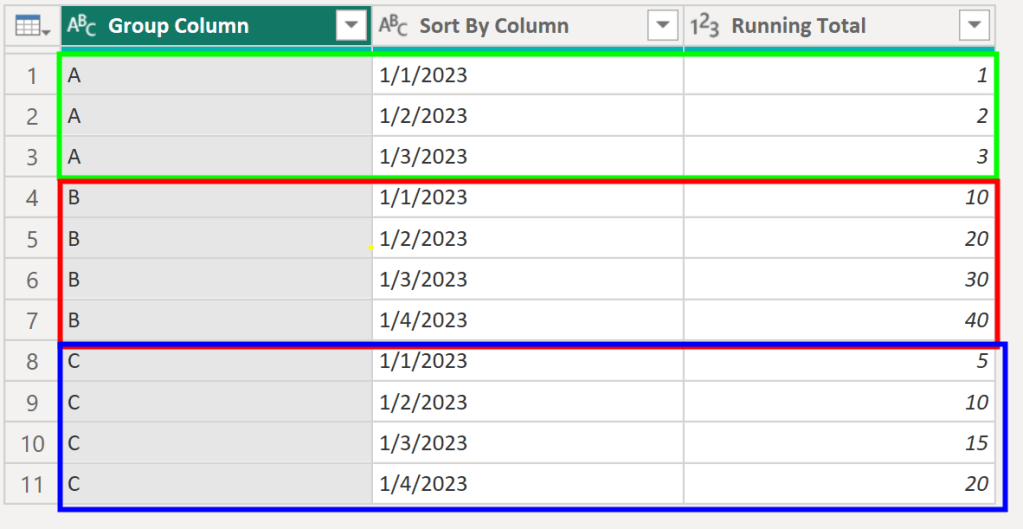
As you can see, the value of Running Total increases for each Group Column over time. What we want is a column that just gets us the change in value for Running total over time for each value in Group Column.
We can do just that using our new custom function:

Example: Multiple cumulative columns with multiple group by columns.
We can also use the function to transform multiple columns with multiple group by columns at once:

Conclusion
Hopefully this function will help you as much as it has helped me. If you have any comments or questions, please let me know. I welcome the feedback!

 DAX Noob
Leave a comment