
- Introduction
- Overview: fxSplitCamelCaseColumns
- Required Custom Functions
- Function without documentation
- Function with documentation
- Examples
- Conclusion
Introduction
Click here to go straight to the function.
In a previous post, I shared a custom function called fxSplitCamelCaseText that splits a string stored in camel or pascal case into multiple words separated by spaces.
That function was created primarily to be used in another function called fxSplitCamelCaseColumns that converts all camel/pascal case columns into proper case. In this post, I want to share that function with you.
Overview: fxSplitCamelCaseColumns
Purpose:
This function splits all camel case column names in a table and converts them to proper case. The function also takes an optional list of alternative column name transformations.
Parameters:
tableToTransform as table
The table whose column names you want to transform.
optional columnNameOverrides as list
A list of column name overrides to be used instead of the default transformation.
Required Custom Functions
This function is dependent on these additional custom functions. Copy them into your Power Query project for fxSplitCamelCaseColumns function to work.
Function without documentation
let
    fxFunction =
        (
            tableToTransform as table,
            optional columnNameOverrides as nullable list
        ) as table =>
            let
                _source_column_names =
                    Table.ColumnNames ( tableToTransform ),
                _clean_column_name_overrides =
                    columnNameOverrides ?? {},
                _columns_to_override =
                    List.Transform (
                        _clean_column_name_overrides,
                        each _{ 0 }
                    ),
                _columns_to_transform =
                    List.RemoveItems (
                        _source_column_names,
                        _columns_to_override
                    ),
                _transform_source_column_names =
                    List.Transform (
                        _columns_to_transform,
                        each
                            {
                                _,
                                fxSplitCamelCaseText ( _ )
                            }
                    ),
                _combine_lists =
                    List.Combine (
                        {
                            _clean_column_name_overrides,
                            _transform_source_column_names
                        }
                    ),
                _apply_changes =
                    Table.RenameColumns (
                        tableToTransform,
                        _combine_lists
                    )
            in
                _apply_changes
in
    fxFunction
Function with documentation
let
    fxFunction =
        (
            tableToTransform as table,
            optional columnNameOverrides as nullable list
        ) as table =>
            let
                _source_column_names =
                    Table.ColumnNames ( tableToTransform ),
                _clean_column_name_overrides =
                    columnNameOverrides ?? {},
                _columns_to_override =
                    List.Transform (
                        _clean_column_name_overrides,
                        each _{ 0 }
                    ),
                _columns_to_transform =
                    List.RemoveItems (
                        _source_column_names,
                        _columns_to_override
                    ),
                _transform_source_column_names =
                    List.Transform (
                        _columns_to_transform,
                        each
                            {
                                _,
                                fxSplitCamelCaseText ( _ )
                            }
                    ),
                _combine_lists =
                    List.Combine (
                        {
                            _clean_column_name_overrides,
                            _transform_source_column_names
                        }
                    ),
                _apply_changes =
                    Table.RenameColumns (
                        tableToTransform,
                        _combine_lists
                    )
            in
                _apply_changes,
    fxDocumentation =
        type function (
            tableToTransform as (
                type table meta [
                    Documentation.FieldCaption = "Table To Transform",
                    Documentation.FieldDescription = "The table whose column names you want to transform.",
                    Documentation.SampleValues =
                        {
                            "#table()"
                        }
                ]
            ),
            optional columnNameOverrides as (
                type nullable list meta [
                    Documentation.FieldCaption = "Column Name Overrides",
                    Documentation.FieldDescription = "A list of column name overrides to be used instead of the default transformation.",
                    Documentation.SampleValues =
                        {
                            "{ ""OldColumnName"", ""Override Column Name"", }"
                        }
                ]
            )
        ) as text meta
            [
                Documentation.Name = "fxSplitCamelCaseColumns",
                Documentation.Description = "This function splits all camel case column names in a table and converts them to proper case. The function also takes an optional list of alternative column name transformations.",
                Documentation.Category = "Clean"
            ],
    fxReplaceMeta =
        Value.ReplaceType (
            fxFunction,
            fxDocumentation
        )
in
    fxReplaceMeta
Examples
Example 1: Transformed columns without overrides
Table with camel case column names:

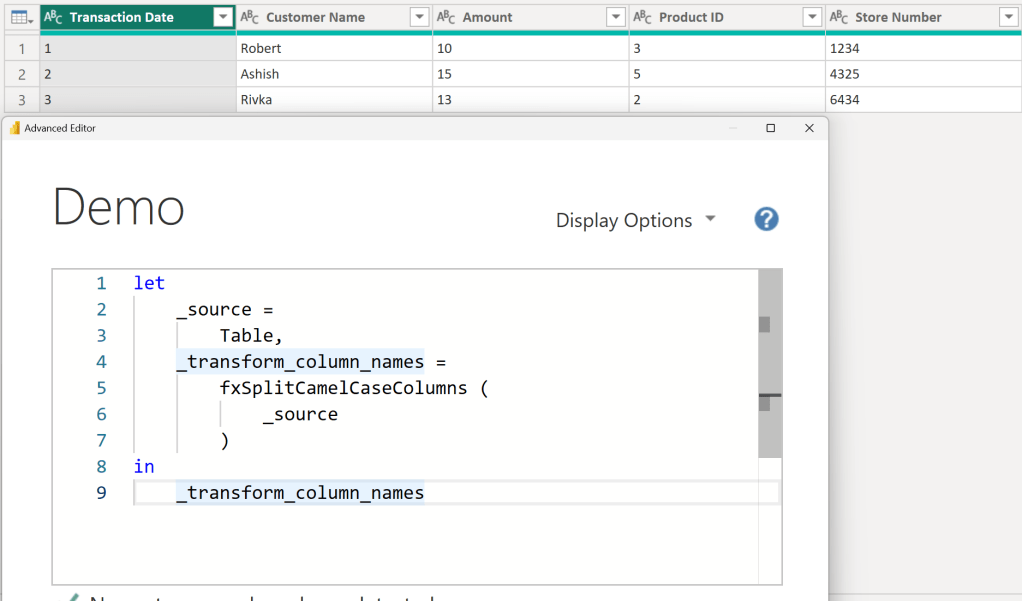
Using the custom function to transform the column names:
Example 2: Transformed columns with overrides
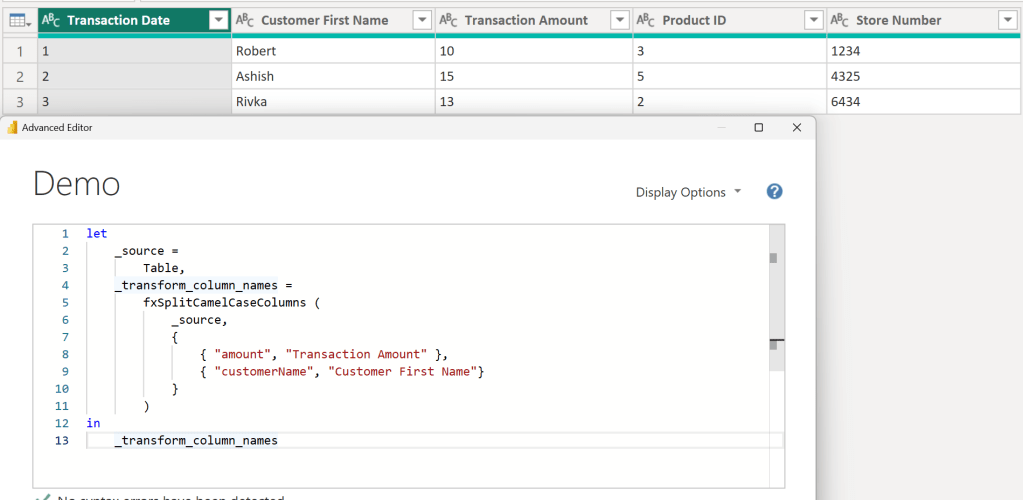
Using the custom function to transform the column names and provider alternate transformations for two columns:

Conclusion
Hopefully this function will help you as much as it has helped me. If you have any comments or questions, please let me know. I welcome the feedback!

 DAX Noob
Leave a comment