

- Introduction
- Overview: fxReplaceWithDefaultValue
- Required Custom Functions
- Function without documentation
- Function with documentation
- Examples
- Conclusion
Introduction
Click here to go straight to the function.
When cleaning data, one thing you have to consider is how to handle null or blank values.
My preference is to replace them with an alternative default value such as the string “Unknown.”
Blanks and nulls can cause confusion for users. Consider the image below:

As a user, I might be asking:
- Why are there two blank rows in the table❓
- Is there a difference between “(Blank)” and “”❓
- Is the data corrupted❓
- Can I trust what I am looking at❓
By replacing the nulls and blanks with “Unknown,” the report looks cleaner and instills more trust for the user.

Unfortunately, blanks and nulls come in all shapes and sizes. Depending on the data source, any one of these values can be present:
- null
- null (as a text)
- empty
- “” (empty text)
- EMPTY
- etc.
The function below was created to help clean up common null and like-null values in your data, all in one step.
Overview: fxReplaceWithDefaultValue
Purpose:
This function replaces nulls and like null values with a default, standard value.
Parameters:
tableToTransform as table
The table you want to replace values on.
columnsToTransform as list
The list of column names to perform the transformation on.
optional replaceNumbers as logical
Boolean flag to determine if null numbers should be replaced with 0.
Required Custom Functions
None.
Function without documentation
let
    fxFunction =
        (
            tableToTransform as table,
            columnsToTransform as list,
            optional replaceNumbers as logical // if set to false, columns with number type are ignored
        ) as table =>
            let
                _table_schema =
                    Table.Buffer (
                        Table.SelectRows (
                            Table.Schema ( tableToTransform ),
                            each
                                List.Contains (
                                    columnsToTransform,
                                    [Name]
                                )
                        )
                    ),
                _replace_skey_null =
                    Table.ReplaceValue (
                        tableToTransform,
                        null,
                        -1,
                        Replacer.ReplaceValue,
                        Table.SelectRows (
                            _table_schema,
                            each
                                Text.Start (
                                    [Name],
                                    6
                                ) = "_SKey "
                        )[Name]
                    ),
                _replace_text_null =
                    Table.TransformColumns (
                        _replace_skey_null,
                        List.Transform (
                            Table.SelectRows (
                                _table_schema,
                                each
                                    [Kind] = "text"
                            )[Name],
                            each {
                                _,
                                each
                                    if
                                        List.Contains (
                                            {
                                                null,
                                                "blank",
                                                "empty",
                                                "unknown",
                                                "null",
                                                ""
                                            },
                                            Text.Lower ( _ )
                                        )
                                    then
                                        "Unknown"
                                    else
                                        _,
                                type
                                    text
                            }
                        )
                    ),
                _replace_number_null =
                    if
                        replaceNumbers ?? false
                    then
                        Table.ReplaceValue (
                            _replace_text_null,
                            null,
                            0,
                            Replacer.ReplaceValue,
                            Table.SelectRows (
                                _table_schema,
                                each
                                    [Kind] = "number"
                            )[Name]
                        )
                    else
                        _replace_text_null
            in
                _replace_number_null
in
    fxFunction
Function with documentation
let
    fxFunction =
        (
            tableToTransform as table,
            columnsToTransform as list,
            optional replaceNumbers as logical // if set to false, columns with number type are ignored
        ) as table =>
            let
                _table_schema =
                    Table.Buffer (
                        Table.SelectRows (
                            Table.Schema ( tableToTransform ),
                            each
                                List.Contains (
                                    columnsToTransform,
                                    [Name]
                                )
                        )
                    ),
                _replace_skey_null =
                    Table.ReplaceValue (
                        tableToTransform,
                        null,
                        -1,
                        Replacer.ReplaceValue,
                        Table.SelectRows (
                            _table_schema,
                            each
                                Text.Start (
                                    [Name],
                                    6
                                ) = "_SKey "
                        )[Name]
                    ),
                _replace_text_null =
                    Table.TransformColumns (
                        _replace_skey_null,
                        List.Transform (
                            Table.SelectRows (
                                _table_schema,
                                each
                                    [Kind] = "text"
                            )[Name],
                            each {
                                _,
                                each
                                    if
                                        List.Contains (
                                            {
                                                null,
                                                "blank",
                                                "empty",
                                                "unknown",
                                                "null",
                                                ""
                                            },
                                            Text.Lower ( _ )
                                        )
                                    then
                                        "Unknown"
                                    else
                                        _,
                                type
                                    text
                            }
                        )
                    ),
                _replace_number_null =
                    if
                        replaceNumbers ?? false
                    then
                        Table.ReplaceValue (
                            _replace_text_null,
                            null,
                            0,
                            Replacer.ReplaceValue,
                            Table.SelectRows (
                                _table_schema,
                                each
                                    [Kind] = "number"
                            )[Name]
                        )
                    else
                        _replace_text_null
            in
                _replace_number_null,
    fxDocumentation =
        type function (
            tableToTransform as (
                type table meta [
                    Documentation.FieldCaption = "Table to Transform",
                    Documentation.FieldDescription = "The table you want to replace values on."
                ]
            ),
            columnsToTransform as (
                type list meta [
                    Documentation.FieldCaption = "Columns To Transform",
                    Documentation.FieldDescription = "The list of column names to perform the transformation on."
                ]
            ),
            optional replaceNumbers as (
                type logical meta [
                    Documentation.FieldCaption = "Replace Numbers",
                    Documentation.FieldDescription = "Boolean flag to determine if null numbers should be replaced with 0."
                ]
            )
        ) as table meta
            [
                Documentation.Name = "fxReplaceWithDefaultValue",
                Documentation.Description = "Replaces nulls and like null values with a default, standard value.",
                Documentation.Category = "Clean",
                Documentation.Examples =
                    {
                        [
                            Description = "",
                            Code =
                                "
fxReplaceWithDefaultValues ( #table (), true, true )
TextCol, NumberCol
Hello, 1
Test, 2,
Justin, null,
(blank), 3,
BLANK, 4
                                ",
                            Result =
                                "
TextCol, NumberCol
Hello, 1
Test, 2,
Justin, 0,
Unknown, 3,
Unknown, 4
                                "
                        ]
                    }
            ],
    fxReplaceMeta =
        Value.ReplaceType (
            fxFunction,
            fxDocumentation
        )
in
    fxReplaceMeta
Examples
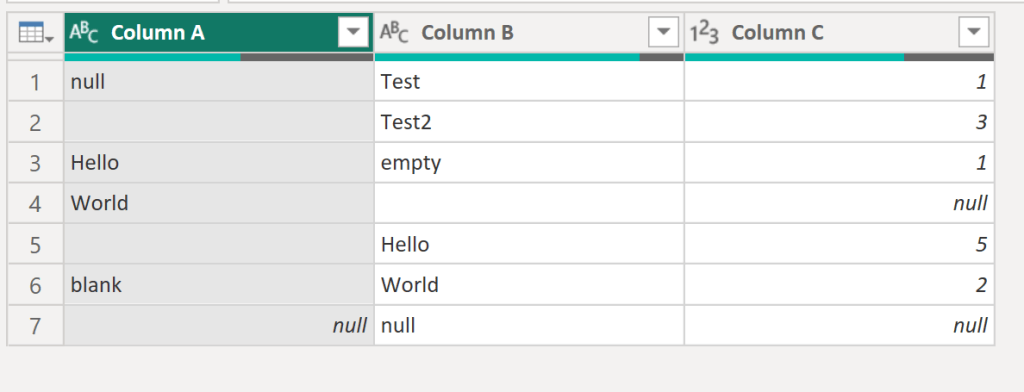
Example 1: Cleaning table values without replacing numeric values
Original table with like null values:
Data cleaned with custom function:

Example 2: Cleaning table values and replacing numeric values
Data cleaned (including numeric columns) with custom function:

Conclusion
Hopefully this function will help you as much as it has helped me. If you have any comments or questions, please let me know. I welcome the feedback!

 DAX Noob
Leave a comment