
Power Query/M
-
Extracting Semantic Model Source Tables with Fabric Notebooks

Introduction In an internal Microsoft Fabric support channel, someone asked, “My customer has multiple workspaces, each containing several semantic models. They are looking for a way to list all tables within each semantic model without manually opening each one.” Described below is an easy way to extract all of the source tables from multiple semantic Continue reading
-
Sometimes It’s Good to Fail: Raising Errors with Data Quality Tests

Introduction Having your dataflows or semantic models fail to refresh can be frustrating, but at least you know that whatever caused the error did not make it into your production assets. Your data might be stale, but you have the ability to go into the code, make the fix, and kick off another refresh. Something Continue reading
-
Custom M Function #7: fxReplaceWithDefaultValue

Introduction Click here to go straight to the function. When cleaning data, one thing you have to consider is how to handle null or blank values. My preference is to replace them with an alternative default value such as the string “Unknown.” Blanks and nulls can cause confusion for users. Consider the image below: As Continue reading
-
Custom M Function #6: fxSplitCamelCaseColumns
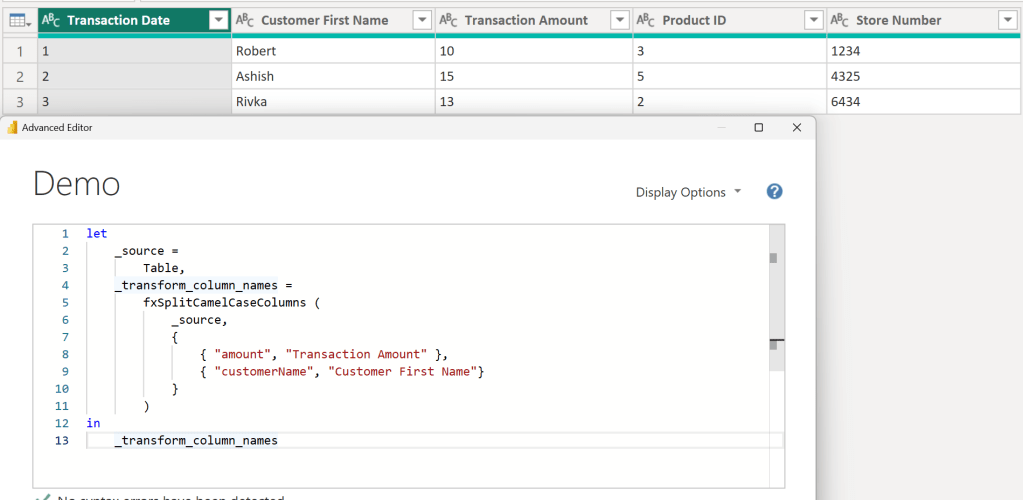
Introduction Click here to go straight to the function. In a previous post, I shared a custom function called fxSplitCamelCaseText that splits a string stored in camel or pascal case into multiple words separated by spaces. That function was created primarily to be used in another function called fxSplitCamelCaseColumns that converts all camel/pascal case columns Continue reading
-
Custom M Function #5: fxCumulativeToIncremental

Introduction Click here to go straight to the function. *Big thanks to Gil Raviv for his cumulative to incremental article for helping me get started creating this custom function.* When working with data in Power BI, my preference is to work with fully additive facts. Kimball briefly explains fact additivity here: The numeric measures in Continue reading
-
Power Query Level Up: Exploring the Advanced Editor and the M Language

Recently, I had the privilege of delivering my first public training session at the 2024 Global Power Platform Bootcamp where I gave an introduction to the Power Query Advanced Editor and the M Language. I’ve included a recording of the training below. Making the leap from the Power Query UI to using the Advanced Editor Continue reading
-
Custom M Function #4: fxSetColumnTypesFromModel

Introduction Click here to go straight to the function. *Disclaimer* this function is not the most exciting but is used in a few other more exciting functions I plan on sharing. Sometimes when performing transformations in Power Query, data types are lost, e.g., when unioning two tables and columns with the same name have different Continue reading
-
Custom M Function #3: fxSplitCamelCaseText

Introduction Click here to go straight to the function. When importing data from a database, column names are often stored in camel or pascal case because of the challenges/inconveniences spaces can cause. While it is best practice to avoid spaces in SQL column names, I prefer storing Power BI column names in proper case because Continue reading
-
Custom M Function #2: fxGenerateSurrogateKeyColumn

Introduction Click here to go straight to the function. One of the key (pun intended) aspects of dimensional modeling is the creation of surrogate keys in your dimension tables. A surrogate key is a column generated to serve as the primary key of the dimension in lieu of the natural key. There are many reasons Continue reading
-
Custom M Function #1: fxJoinAndExpandTable

Introduction Click here to go straight to the function. If you are doing any type of dimensional modeling in Power BI using Power Query, you are probably very familiar with the “Merge Queries” button that helps the user join two tables together. Although the GUI is very useful, the resulting code may not be as Continue reading
 DAX Noob